Deep Gratitude Journaling: Get more out of your gratitude practice on your iPad
I’ve had a gratitude journaling practice for a few years now. I try daily to write at least 3 things I’m grateful for each day in my digital planner or my variety of notebooks. Some days, I’m full of joy and am able to pick out 3 unique things I’m grateful for.
Gratitude journaling worked for me—but also didn’t. More times than not, my gratitude practice consisted of me rattling off 3 easy-to-name things just so I could cross it off from my task list.
I saw the benefits of keeping a gratitude journal, but I knew something had to change so I could get more out of it.
A deep gratitude journal improves mental health

I can’t take credit for this idea—my therapist recommended practicing deep gratitude. A close follower of Cal Newport, author of Deep Work and proponent of helping others live a deep life, my ears perked up immediately at the buzzword-heavy suggestion.
Therapist: “By going into the details of what you’re grateful for, you’ll gain a deeper practice, which can positively influence your levels of self-compassion.”
Me: “I need all these things. I will start tonight.”
By removing the word limit on the things I was grateful for, “my awesome desk chair” became long-form gratitude poetry about how sitting in the chair makes me feel emotionally—and how it saves my fidget-prone legs because of its physical design. I went from 4 words to a paragraph about why I loved the things I’m grateful for.
Besides writing about the comfort of chairs, I also went into detail about the bubbly peal of my kids’ laughter. The warmth of hugs. That fall, I also went so far as to journal about my gratitude for the almost impossibly bright red leaves littering my lawn from one of our trees (not the amount of work it’d take me to clean up said leaves).
Deep gratitude struck a chord with me and changed my thinking.
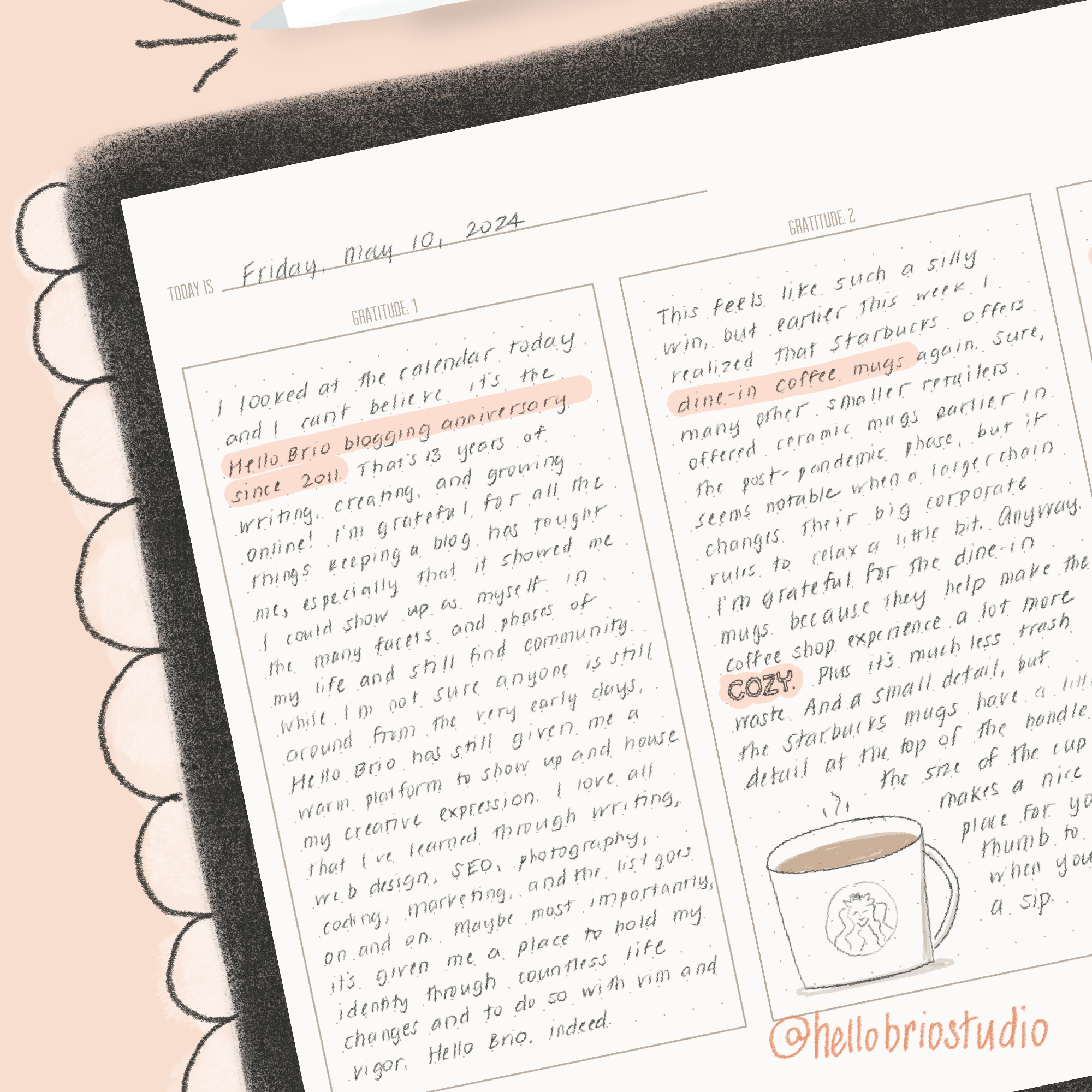
On an all-too-common 4am walk with Erma the dog over a prematurely wintery weekend, I believe my deeper gratitude practice helped me swap my default victim mindset to one of awe and love because I’d reprogrammed my brain to see things with curiosity instead of taking them for granted.
The pitch blackness of the very early morning and the piercing 30-degree weather shocked my system, but shortly after we started our walk, I noticed that the grass sparkled under the streetlights. I ended up thoroughly enjoying my 4am, 30º walk with Erma, feeling as if the neighbors’ yards were dusted with glitter overnight just for me.
Benefits of digital gratitude journaling on the iPad
I’ve talked about so many benefits of digital journaling in past posts, so I won’t go to far into why digital journaling is awesome in general.
But… gratitude journaling is particularly helpful on the iPad because:
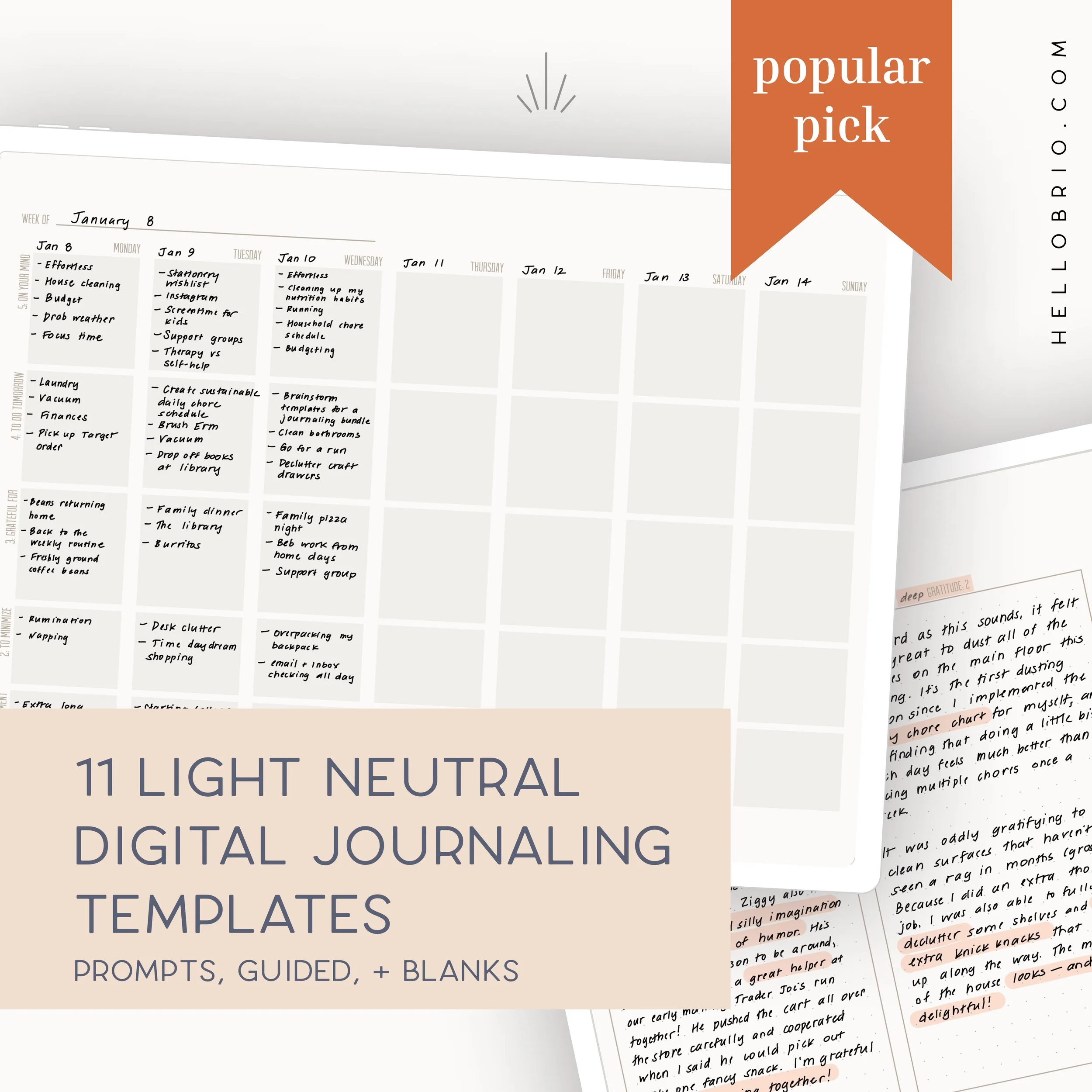
This light, neutral journaling bundle is perfect for tablet users who love the freedom and flexibility of a blank journal but want a tad more structure and prompts for ideas on what to journal about. Plus, it saves you from having to draw the same layouts over and over!
Find the video walkthrough on YouTube here.
Optimized for Notability but can also be used in Goodnotes or other iPad PDF-markup apps.
The download includes 11 un-dated, horizontal PDF templates, both good for guided digital journaling and long-form digital journaling like Morning Pages or stream-of-consciousness journaling.
Monthly mental health tracker
Daily check-in
Weekly rose, thorn, and seed log
Weekly review
Daily deep gratitude log
Short-form gratitude log (4 per page)
Blank dot spread
Blank grid spread
Blank lined spread
Note: This is a digital download. No physical item(s) will be shipped. You will receive a link to download your file(s) after purchase. You need to unzip the file before using it in a note-taking app. No refunds or exchanges are permitted.
You can create a dedicated gratitude journal in Notability. With a dedicated gratitude journal in Notability, you can page through all of your deep gratitude (or regular gratitude journaling) in one spot.
Using a digital gratitude journal makes it easier to keep the habit. Have your iPad on you at all times anyway? Then you’re just a few taps away from adding your gratitude journal entry for the day. No longer do you have to go into another room of your house to find your separate gratitude journal.
Use the gratitude journal format that works for you in the moment. Some days or weeks you might want to rapid-log your gratitude journal entries. But if you lean into deep journaling, you can have your deep gratitude journal template right there. I created a digital journaling bundle that has a 3-column deep journaling template for just this reason. Anyway, no more missed or wasted days from pre-printed gratitude journals.
One less journal or notebook. I get the struggle of having too many notebooks. They don’t all quite fit in your backpack, and you may not want to travel with all of them. Your trusty iPad is just there, holding all of your journals and planners in one trusty app. You can even reference your other digital planners and journals right there in Notability without causing back problems.
Related Articles:
How to start your deep gratitude journal in Notability
If you’re already journaling on your iPad in Notability, a deep gratitude journal is just a few clicks away.
I recommend having all journals in a locked subject in Notability. This adds an extra layer of privacy, especially if you share your iPad with family members.
If you don’t already have a journaling Subject, go ahead and:
Select the plus sign next to Subjects
Select New Subject
Name your Subject. I have mine as “🔐 journal” **(**because why not add emojis to everything)
Long press on your new Subject and select Edit
At the bottom, toggle on Lock Subject
Select Save
Within your journaling Subject, tap the blue New button. Scroll down on the page to name your notebook, and select the paper type you want.
You don’t really need anything else to start your deep gratitude journal in Notability—but if you like my digital journaling bundle and want to set up your journal with the deep gratitude journal template, here’s how to do it:
Purchase the digital journaling bundle and import it into Notability
Scroll down to find the deep gratitude template
Select the double Pages icon in the top right
Select the three dots on the page and then select Create Template
Name the template Deep Gratitude; select Save
Go back into your Deep Gratitude Journal and select the three dots on the top right
Select Template settings
At the bottom of the prompt page, select My Templates
Scroll to select your new Deep Gratitude template
Select Apply at the top right
Now, every new page will have the Deep Gratitude template in your notebook! You can also choose another gratitude template or blank journaling template as your base and bring in the deep gratitude template when you want to use it. It’s up to you!
Try a deep gratitude journal on your iPad and let me know how it goes
A deep gratitude practice can help you tap into the magic, beauty, and awe in life. Plus, it’s a nice way to wrap up the day. Give it a shot and let me know how it goes. If you feel brave, share your digital gratitude journal on Instagram and tag me using #hellobrio.
This light, neutral journaling bundle is perfect for tablet users who love the freedom and flexibility of a blank journal but want a tad more structure and prompts for ideas on what to journal about. Plus, it saves you from having to draw the same layouts over and over!
Find the video walkthrough on YouTube here.
Optimized for Notability but can also be used in Goodnotes or other iPad PDF-markup apps.
The download includes 11 un-dated, horizontal PDF templates, both good for guided digital journaling and long-form digital journaling like Morning Pages or stream-of-consciousness journaling.
Monthly mental health tracker
Daily check-in
Weekly rose, thorn, and seed log
Weekly review
Daily deep gratitude log
Short-form gratitude log (4 per page)
Blank dot spread
Blank grid spread
Blank lined spread
Note: This is a digital download. No physical item(s) will be shipped. You will receive a link to download your file(s) after purchase. You need to unzip the file before using it in a note-taking app. No refunds or exchanges are permitted.

This light, neutral planner and journal is perfect for tablet users who love the freedom and flexibility of a bullet journal but want a tad more structure to avoid having to draw the same layouts over and over.
These templates were designed with inspiration from the planner world where many planner-keepers also use their planners as memory-keepers with stickers, doodles, and short-form journaling. I drew inspiration from Hobonichi planners and other popular Japanese planners.
Draw your own memories or use digital stickers to help you fill up your digital planner and journal!
Optimized for Notability but can also be used in Goodnotes or other iPad PDF-markup apps. The grid in this bundle is set to be 3.5mm to mirror more popular smaller-form journaling in the planner world.
The download includes 11 un-dated, horizontal PDF templates:
Day memories
Day planner spread
Day planner with journal
Day schedule with journal
Day tasks with journal
Full week
Weekly journaling
Weekly memory keeping
Weekly memory spread
Monthly memory keeping - 5 weeks
Monthly memory keeping - 6 weeks
Note: This is a digital download. No physical item(s) will be shipped. You will receive a link to download your file(s) after purchase. You need to unzip the file before using it in a note-taking app. No refunds or exchanges are permitted.